Cron Expression Parser & Descriptor
Paste any standard 5-field cron expression to get a human-readable English description, instead of counting asterisks to figure out when a job actually runs. Or switch to the builder and assemble a cron string from a simple structured form (every N minutes, hourly, daily, weekly, or monthly) without memorizing cron syntax.
Reviewed by Vincenzo Manto, Founder & Lead Developer · Last updated September 27, 2026
How it works
- 1
Switch between 'Cron → English' to describe an existing expression, or 'Build a cron expression' to construct one.
- 2
In parser mode, type or paste a standard 5-field cron string and read its plain-English description instantly.
- 3
In builder mode, pick a frequency (every N minutes, hourly, daily, weekly, monthly) and fill in the simple fields.
- 4
Copy the generated cron expression straight into your crontab, CI config, or scheduler.
Screenshots
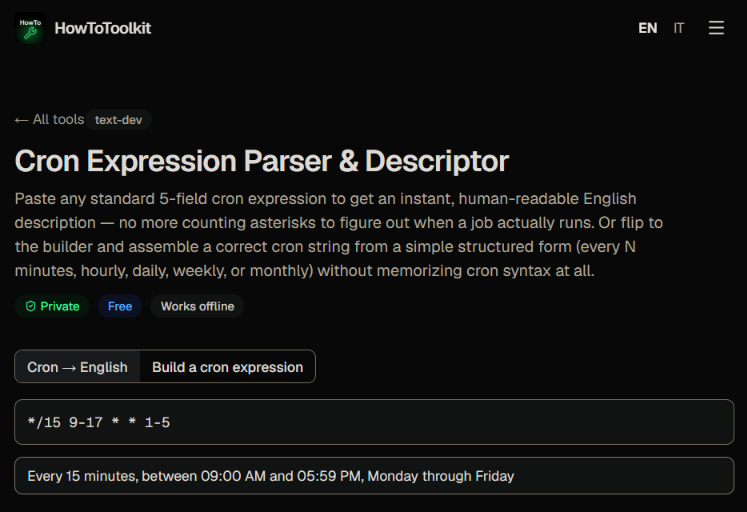
Why cron expressions are hard to read at a glance
A string like `*/15 9-17 * * 1-5` packs a lot of meaning into very few characters, and it's easy to misread a step for a range or mix up which field is which. This tool translates any expression into a full English sentence, which helps when you're reviewing someone else's scheduled job or figuring out why a task ran, or didn't run, at an unexpected time.
Building schedules without memorizing syntax
The builder flips the problem around. Instead of learning cron's field order and special characters, you pick a frequency from a dropdown, daily at a certain time, weekly on a chosen day, and so on, and the tool assembles the correctly-ordered 5-field string for you, ready to paste into a crontab file, a GitHub Actions schedule, or a Kubernetes CronJob spec.
Frequently asked questions
What format of cron expression does this support?
The standard 5-field Unix cron format: minute, hour, day-of-month, month, day-of-week. Each field can be a wildcard (*), a single number, a range (9-17), a step (*/15), or a comma-separated list (1,15,30).
How does the cron-to-English description work?
It uses the well-tested open-source cronstrue library to translate the five fields of your expression into a natural-language sentence, such as 'At minute 15 past every hour from 9 through 17 on every day-of-week from Monday through Friday.'
Is the builder a free-text natural language parser?
No. The builder uses a structured form, a frequency dropdown plus the relevant number fields, rather than trying to parse arbitrary English sentences. That keeps the generated cron string syntactically correct, which free-text parsing can't guarantee.
Does it validate a cron expression I type by hand?
Yes. Before describing your expression, it independently validates each of the 5 fields for correct syntax (wildcards, numbers, ranges, steps, and lists within valid bounds) and shows a clear error if something is malformed.
What does day-of-week 7 mean?
Both 0 and 7 represent Sunday in standard cron syntax, and this tool's validator accepts either.
Does this support 6-field cron expressions with seconds?
No, this tool targets the standard 5-field format used by crontab, most CI schedulers, and Kubernetes CronJobs. Extended 6-field 'seconds' syntax used by some libraries isn't supported.