Regex Tester
Write a JavaScript regular expression and see every match highlighted live against your own text, with capture groups broken out. Supports all standard flags (g, i, m, s, u, y). Nothing leaves your browser.
Reviewed by Vincenzo Manto, Founder & Lead Developer · Last updated September 27, 2026
How it works
- 1
Type your regular expression pattern into the pattern field.
- 2
Toggle flags like g, i, m, s, u, or y as needed.
- 3
Paste the text you want to test against in the text area.
- 4
Matches are highlighted live, with each capture group listed below.
Screenshots
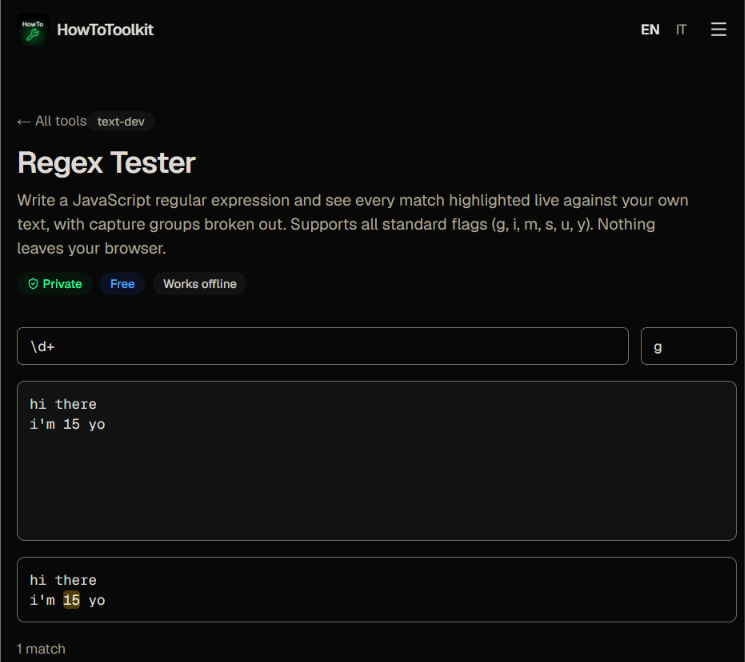
Build and debug regex without leaving the browser
Regular expressions are notoriously hard to get right on the first try - a misplaced quantifier or missing escape can silently break a match. This tester gives you instant visual feedback on real text, so you can iterate on a pattern in seconds instead of running a script after every tweak.
Matches JavaScript's exact regex behavior
Because it's built on the browser's native RegExp object, what you see here is exactly what you'll get when the same pattern runs in a Node.js backend, a React form validator, or a browser extension - no surprises from a different regex flavor with different escaping rules.
Stuck on syntax instead of matches?
If you're not sure how to write the pattern in the first place, keep our regex cheatsheet open in another tab: it covers the anchors, quantifiers, and lookaround syntax this tester expects, so you can look up a construct and try it here in the same breath.
Frequently asked questions
Which regex flavor does this tool use?
It uses native JavaScript regular expressions (the same engine as Node.js and browsers), so patterns behave exactly as they would in your JS or TypeScript code - not PCRE or Python's re module, which have subtle differences.
Why isn't my pattern matching anything?
The most common cause is a missing 'g' flag when you expect multiple matches, or forgetting 'm' when using ^ and $ to match line starts/ends instead of the whole string.
Can I see named or numbered capture groups?
Yes, every match lists its numbered capture groups (and named ones, if your pattern uses (?<name>...)) directly below the highlighted text.
What happens if my regex is invalid?
You'll see the exact JavaScript SyntaxError message the RegExp constructor throws, so you know immediately which part of the pattern is malformed.
Is my test text uploaded anywhere?
No. The matching runs entirely client-side with the browser's RegExp engine - nothing you type is sent to a server.
Does it warn me about catastrophic backtracking?
The tool doesn't statically analyze your pattern for ReDoS risk, so if a pathological pattern hangs on certain input, you may need to shorten the test text or simplify the expression to see results.