AI Image Prompt Builder
Describe your subject, then pick a style, lighting, camera, mood, colour palette and quality boosters from dropdowns to assemble a detailed image prompt. Switch the target to get the right syntax: Midjourney gets --ar and --no parameters, Stable Diffusion gets a separate negative prompt, and DALL·E gets a natural-language sentence. Copy the result in one click or randomize the style for inspiration.
Reviewed by Vincenzo Manto, Founder & Lead Developer · Last updated September 30, 2026
How it works
- 1
Write the main subject of your image.
- 2
Choose style, lighting, camera, mood, palette and quality options, plus anything to avoid.
- 3
Select your target generator and copy the finished prompt.
Screenshots
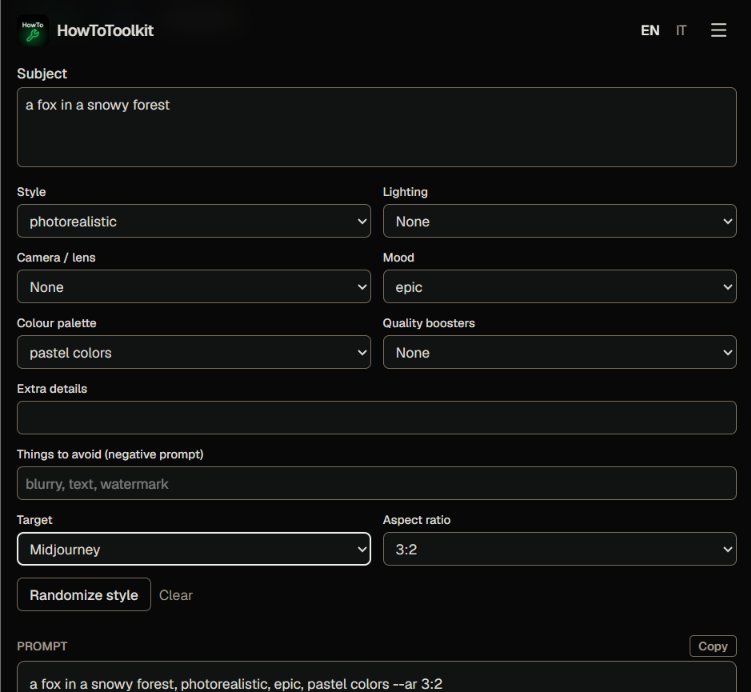
Example
Subject: a lighthouse on a cliff
Style: oil painting
Lighting: golden hour light
Mood: epic
Target: Midjourney, 16:9, avoid texta lighthouse on a cliff, oil painting, golden hour light, epic --ar 16:9 --no textWhat makes a good image prompt
A strong prompt names one clear subject, states the medium or style, and adds a few precise details about light, viewpoint and mood. Too many conflicting descriptors dilute the result, so start short, generate, and add one modifier at a time. Quality boosters help less than concrete visual details, so use them sparingly.
Adapting prompts between generators
Each generator reads prompts differently. Midjourney likes comma-separated fragments with parameters at the end, Stable Diffusion benefits from a negative prompt to suppress artifacts, and DALL·E-style models follow descriptive sentences. Building from the same ingredients lets you test one idea across several tools quickly.
Frequently asked questions
Why structure a prompt this way?
Image models respond best to a clear subject followed by descriptors for style, light, lens and mood. Building prompts from consistent parts makes results easier to compare and to refine one variable at a time.
What does the target setting change?
Midjourney uses --ar for the aspect ratio and --no for exclusions. Stable Diffusion takes a separate negative prompt field. DALL·E and ChatGPT respond well to a natural sentence, so the output is written as one.
Does this call an AI service?
No. The prompt is assembled locally from your choices, so there are no accounts, credits or data sent anywhere. You paste the result into the generator of your choice.
Are the presets exhaustive?
They are a curated starting set. Use the extra details field to add anything else, such as specific artists' styles, materials, locations or camera models.